Features Guides Tools Get the app

AI Workout Planner

An AI-built workout plan that adapts with you

Build a program around your goals and equipment, or bring the one you already have. Zena tracks every set and checks how you've recovered before each session.

Download on the App Store

14-day free trial, then $5.99/month or $49.99/year (USD). iPhone only.
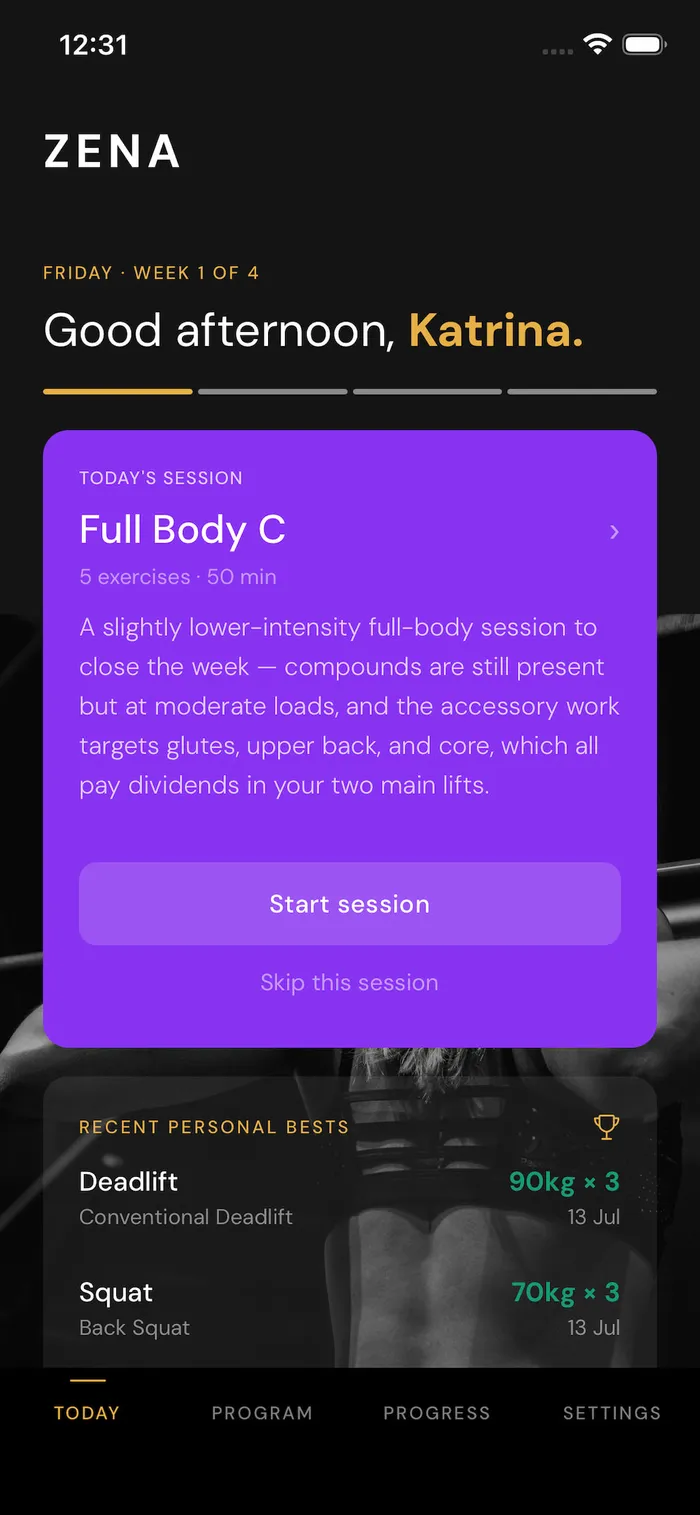
Zena app Today screen showing an AI-generated Full Body strength session and recent personal bests for deadlift and squat
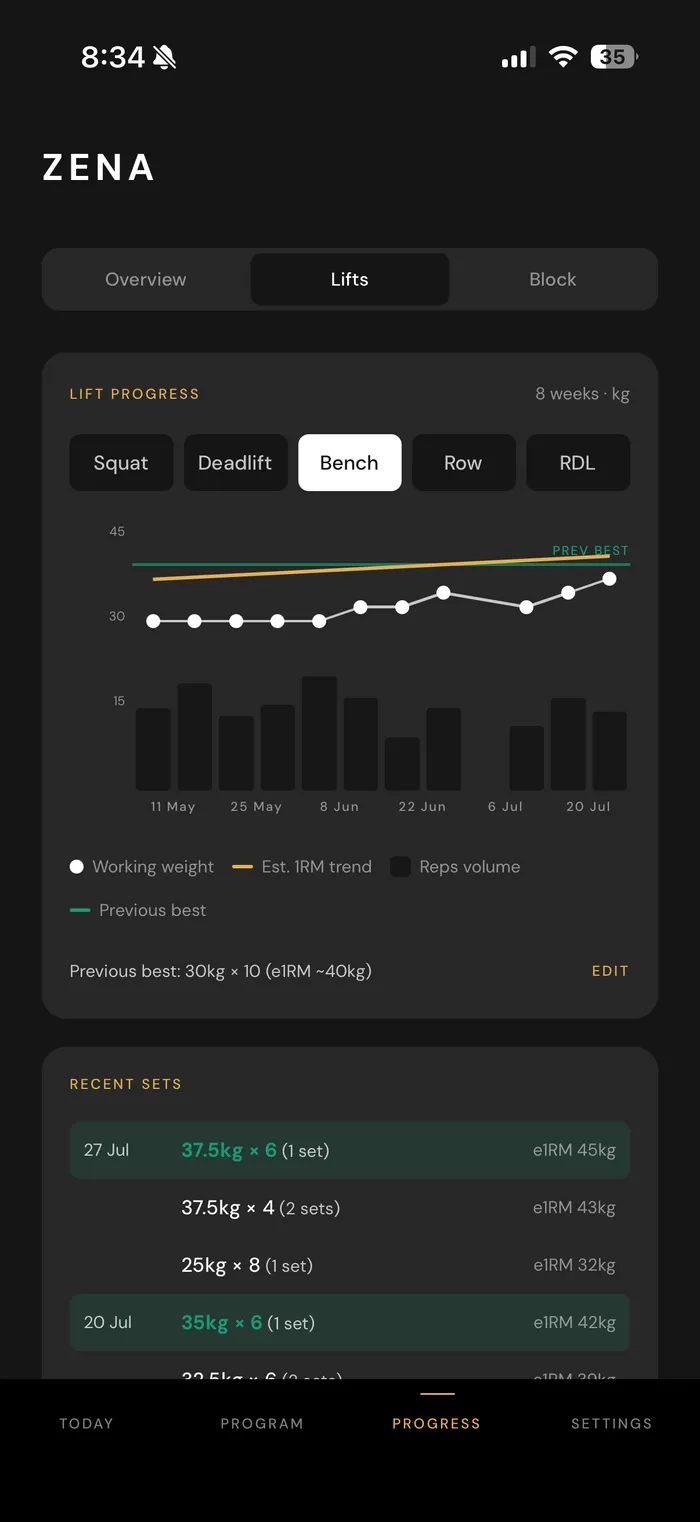
Zena app progress screen showing an 8-week bench press trend chart with working weight, estimated 1-rep max, and recent logged sets

Before every session

Know whether today is a push day or an ease-off day

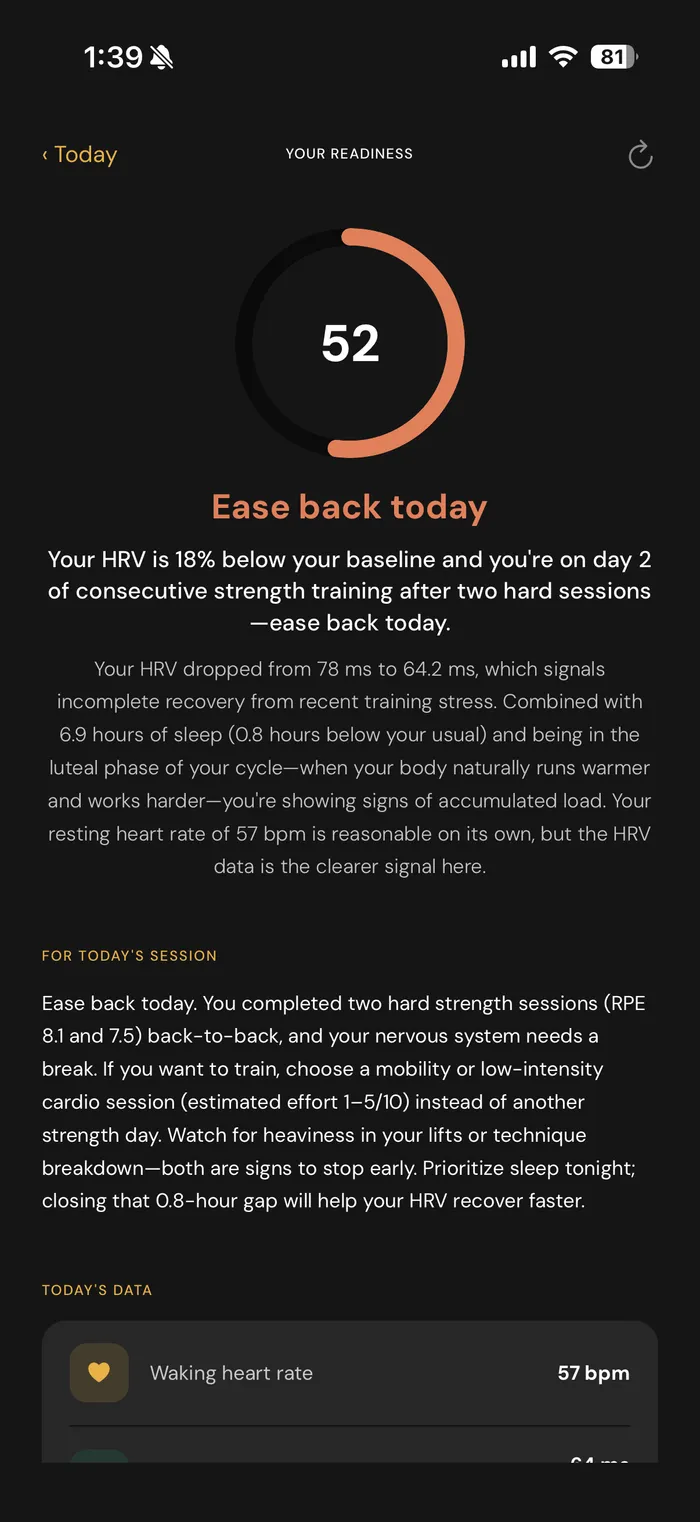
Zena reads your sleep, heart rate variability (HRV), resting heart rate and a waking heart rate signal from Apple Health, where your Apple Watch or other wearable saves them. Each day you get a clear read (Ready, Moderate, Ease back or Rest) and a specific suggestion for today's session, like lowering the weight, cutting a set or pushing harder, with the reason why.

If you track your cycle in Apple Health, Zena can factor that in too. It's optional, and it's treated as information, not a rule.

Zena app readiness screen showing an 'Ease back today' recommendation, and the HRV, sleep, and cycle data behind it

Your program, your way

Build a plan in minutes, or keep the one you have

Tell Zena your goal, schedule, current lifts and equipment, and it builds a multi-week program around exactly that, sense-checking your goal against your timeline first.

Already have a plan from ChatGPT, a trainer or a spreadsheet? Paste it in. Zena turns it into a program you can track and adds the coaching on top.

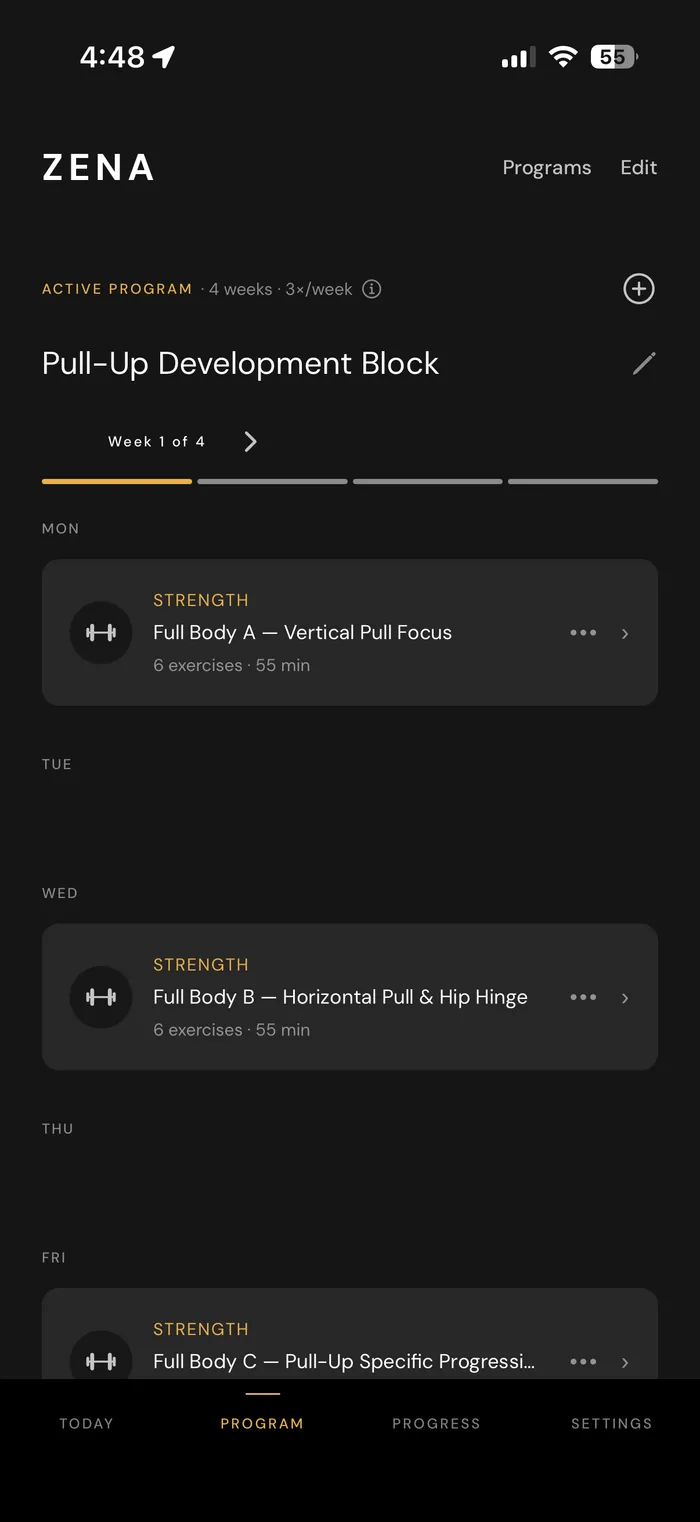
Zena app showing a 4-week Pull-Up Development Block program, with each day's workout laid out for the week

During the workout

Know exactly when to go heavier

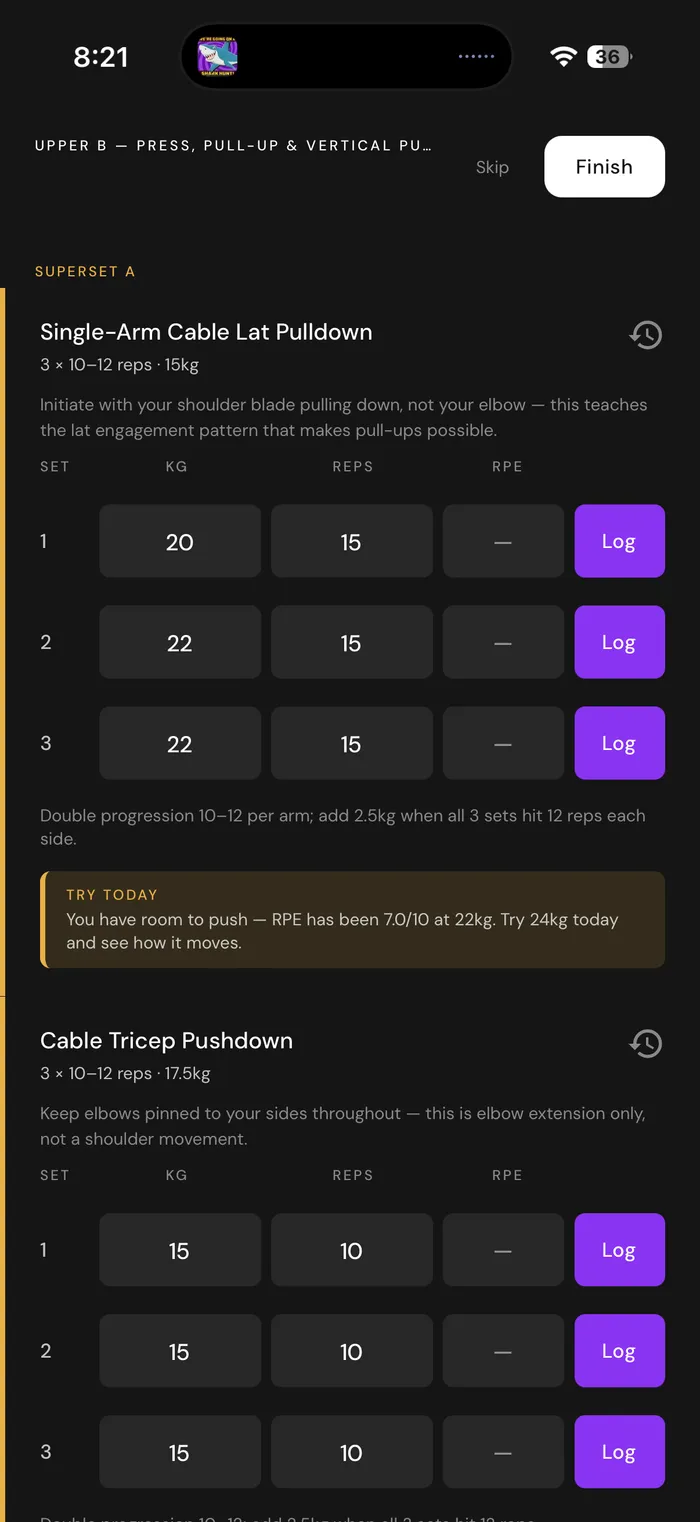
Every set is pre-filled with what you actually lifted last time. When your logged performance and recovery show you're ready, Zena suggests the next weight, using the plates and dumbbells you actually have. No spreadsheet, no scrolling back through a chat.

Zena app workout logging screen for a Deadlift & Glute Focus session, showing set-by-set weight and rep targets with a note on why the starting weight was chosen

How Zena compares

Zena vs ChatGPT, Fitbod and Planfit

How Zena compares with ChatGPT, Fitbod and Planfit. Competitor details last checked 30 September 2026.
ChatGPT Fitbod / Planfit Zena
Writes you a program Yes Yes Yes
Logs every set you lift No Yes Yes
Checks your sleep and heart data before each session and suggests changes No No Yes
Imports a plan from ChatGPT, a PDF or a spreadsheet, ready to log No No Yes
Built for women, and can factor in your cycle No No Yes

In the US, ChatGPT can connect to Apple Health and discuss your sleep, activity and other health data when you ask, but it doesn't check in before each session or change your plan on its own. Fitbod and Planfit estimate muscle recovery from the training you log. Zena's readiness features need an Apple Watch or other wearable. Competitor details last checked 30 September 2026.

Ready to try Zena's AI workout planner? Start your 14-day free trial.

Download on the App Store

Not ready for an app yet?

Start with this ChatGPT prompt

If you'd rather begin with AI chat, this prompt gets you a much better strength plan than "write me a workout". It works in ChatGPT, Claude or Gemini. Fill in the brackets.

Act as a strength coach and write me an 8-week strength training plan.

About me:
- Experience: [e.g. brand new to lifting / about a year of gym classes]
- Days per week: [e.g. 3]
- Session length: [e.g. 45–60 minutes]
- Equipment: [list exactly what you have, e.g. dumbbells up to 20kg, a bench, a cable machine]
- Current lifts, if I know them: [e.g. goblet squat 12kg for 10], or "I don't know yet"
- Injuries or movements to avoid: [or "none"]
- Goal: [e.g. get stronger at squats and do my first push-up from the floor]

Please:
1. Use full-body sessions built around a squat, a hinge (like a deadlift or hip thrust), a push and a pull, plus one or two extra exercises.
2. For each exercise, give sets, a rep range and rest time.
3. Tell me how to choose a starting weight in week 1 if I don't know my numbers.
4. Give me one clear rule for progressing: exactly when to add reps and when to add weight.
5. Build in one lighter week and tell me when it is.
6. Give one alternative for each exercise in case the equipment is busy.
7. Put the plan in a simple table I can copy into a notes app or a training app.

What to do with the plan it gives you

  1. Check it actually progresses. If week 6 looks the same as week 1, ask it to rewrite with specific weekly increases.
  2. Treat week 1 as a test. Choose starting weights you could lift for two or three more reps than the target, then adjust. If you're new to lifting, start lighter than you think.
  3. Write down every set. Weight and reps, every session. Without a record, you can't follow a progression rule.
  4. Feed your results back in. Every week or two, paste your numbers into the chat and ask what to change. Our guide to getting more from a ChatGPT plan covers this in more detail.
  5. Pain isn't a signal to push through. An AI chat can't see your form. If a movement causes sharp pain or joint pain (not the normal burn of effort), stop that exercise. If the pain lasts more than a few days, or comes with swelling, numbness or pain at rest, see a physio or doctor before you train it again.

Prefer not to do steps 3 and 4 by hand? Import the plan into Zena. It keeps the log for you, pre-fills last session's numbers, and tells you when to go heavier.

Common questions

Why Zena?

Why use Zena instead of ChatGPT?

ChatGPT is a good way to get a first plan. What it doesn't do is run the plan with you. It doesn't log your sets, and it won't change today's session on its own. (In the US it can discuss your Apple Health data when you ask, but it doesn't check in before each session.) Zena logs every set, pre-fills what you lifted last time, checks your sleep and heart data before each session (with an Apple Watch or other wearable) and tells you whether to push, ease off or rest, and suggests when to go heavier. Already have a ChatGPT plan? Import it and keep it.

How is Zena different from Fitbod or Planfit?

Fitbod and Planfit build your workouts and estimate muscle recovery from the training you log. Zena also reads your sleep, HRV and resting heart rate from Apple Health (you'll need an Apple Watch or another wearable), so a bad night's sleep can change what it suggests for today's session, not just how recovered it thinks your legs are. It can also import a plan you already have, and it's built for women, with your cycle data from Apple Health factored in if you track it. A few newer apps also use wearable data, so if that matters to you, check what each app actually reads.

Can I keep the plan I already have?

Yes. Paste in a plan from ChatGPT, a trainer, a PDF or a spreadsheet, and Zena turns it into a program you can track, with logging, progression suggestions and recovery-based suggestions on top.

Do I need an Apple Watch?

No. You can build or import a program, log every workout and get progression suggestions without one. The readiness score and recovery-based recommendations read sleep and heart data from Apple Health, so for those you'll need an Apple Watch or another wearable that saves that data there. Zena itself is an iPhone app; there's no Apple Watch app.

Do I need to understand RPE or HRV?

No. RPE (rating of perceived exertion, how hard a set felt on a 1–10 scale) is optional to log, and Zena explains its readiness reads and recommendations in plain language.

Curious anyway? Here’s what RPE means and how to use it →

How much does Zena cost?

Zena has a 14-day free trial, so you can build or import a program and see how it adjusts before you pay. After that, it's $5.99 USD a month, or $49.99 USD a year with foundation pricing.

Is Zena available on Android?

Not yet. Zena is iPhone only for now.

What is an AI workout planner?

An AI workout planner is a tool that uses AI to create a training program from what you tell it: your goals, experience, schedule and equipment. The best ones keep going after the plan is written, tracking what you lift and adjusting the plan as you go.

Available now

Start your free 14-day trial today

Strength training built for your goals, your equipment and your body. Download Zena and start your first program in minutes.

Available now for iPhone.